Showing posts with label Recovery Softs. Show all posts

Thursday, December 13, 2012

Facebook Password Decryptor

Facebook Password Decryptor is the FREE Software to instantly recover stored Facebook passwords by popular web browsers and messengers.


                       <<DOWNLOAD HERE>> 

Saturday, December 01, 2012

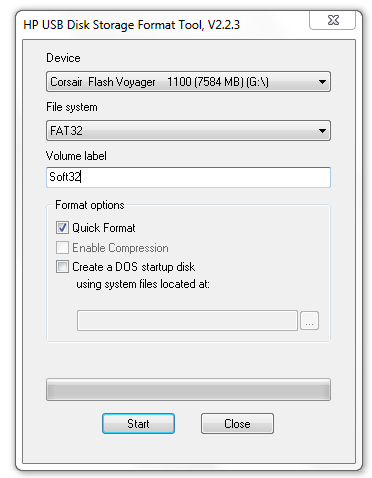
HP USB Disk Storage Format Tool 2.2.3


HP USB Disk Storage Format Tool 


Where would we be without our USB flash drives? Our 
music, pictures, work files, personal data, and just 
about our entire life’s history are often 
stored on the modern day equivalent
of the floppy disk.
We love their portability, file space, and universal 
compatibility, and so too does Hewlett- Packard’s USB 
Disk Storage Format Tool. 

What is it and what does it do?
The HP USB Storage 

Format Tool is a little godsend for 
those who use USB flash drives as 
recovery devices because it is capable of formatting 
virtually any USB flash drive in a diverse 

range of systems. And here’s the best bit. Not only does it install and run very smoothly, the 
interface looks exactly like the standard format which is built into Windows. The key 
difference being where the Windows version does not have the option of selecting USB 
drives to format, the HP USB Storage Format Tool does. Big difference huh?

This funky piece of software also offers users the option of creating a DOS start-up disk, by 
either using the internal MS-DOS system files, or the ones located at a specific path.
Oh! and before we forget, this format tool also allows you to rename all your USB flash 
drives in any way you want and offers a NTFS volume label for format which enable you to 
create a FAT32 volume which is bigger than 32GB. Cool hey?

Pro's: 

USB flash drives just got that little bit better.


Con's: 

We haven’t found any yet!


Conclusion:

The HP USB Disk Storage Format Tool blows us away because by deleting 
space used on flash drivers that cannot be removed in the traditional way, and creating 
bootable USB drives it brings enhanced power and functionality to your system without 
costing you the earth. If you use flash drives, then don't delay and get it today.


                            <<DOWNLOAD HERE>>

Saturday, November 24, 2012

Ontrack Professional 6.21


   Ontrack Professional


EasyRecovery Professional contains advanced data recovery capabilities that allow you to search more than 225 different file types including MIDI music files, voice files, digital media files, and more! Plus you can utilize the Emergency Boot Diskette to recover data from systems that cannot boot to Windows. In addition to the new, more powerful data recovery engine, EasyRecovery Professional now has the power to repair Zip files and Microsoft(R) Outlook(R), Access, Excel, PowerPoint(R) and Word files! Plus the added disk diagnostic features, including Ontrack Data Advisor(R), provide valuable system diagnostic tools to quickly evaluate the health of your hard drive.


Its a Complete solution for your data recovery needs

    * Includes all capabilities plus advanced data recovery options and Data Advisor® diagnostic features

    * General capabilities – data recovery, file repair, disk diagnostics

    * For Windows – AdvancedRecovery and additional Modules – capable of locating all directories and unlimited file types

    * Repair options for Microsoft Outlook and Email files – Outlook (PST, OST), Outlook Express (DBX), Word (DOC), Excel (XLS), Access Database (MDB), PowerPoint (PPT) and Zip (ZIP)

    * For all operating systems – RawRecovery Module – support for over 485 specific file signatures.


                          <<DOWNLOAD HERE>>

Wednesday, November 07, 2012

Recover Deleted Data Using FreeUndelete Software


Recover Deleted Data Using FreeUndelete Software

Many times it happens that we accidentally delete some important data from our computer. In such cases data recovery softwares are very helpful but most of them are paid softwares. There are only few Free data recovery softwares available on the the internet and one of them is FreeUndelete.

Before you use FreeUndelete I advise you not to transfer any data to that particular drive from which you have to recover data as it can reduce your chances of data recovery.

Now In post I will give you download link for the Freeundelete software and also highlight some of its main features.

File systems that are supported by freeundelete Software are:

* NTFS 1.0 and 2.0 (Filesystems of windows NT,Xp,Vista,2000 and Windows 7)
* FAT 12,FAT 16,FAT 32 (Windows 98)

Where are the recovered files stored?

The recovered files will be stored at the user specified destination.